This guide explains what a license key is, where to find it and how to activate your Aura Air device during the app setup process.
What Is a License Key?
A license key is a unique activation code that connects your Aura Air device to the Aura App, enabling full monitoring, analytics and smart air purification functionality.
Every Aura Air device comes with its own license key.
When Do You Need a License Key?
You will need to enter a license key when:
- Setting up a new Aura Air device for the first time
- Installing a replacement filter
- Your current license has expired
- Reactivating a device that was deactivated
Where Can You Find Your License Key?
Your license key can be found in two places:
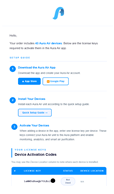
- Welcome email: Your Aura Air welcome email.
- Device box: The license key is printed on the packaging of your Aura Air device.
Keep your welcome email handy during setup.
If you ordered multiple devices, each key in the table corresponds to one device.
Adding a New Device & Activating with a License Key
License key activation happens as part of the New Device setup flow in the app. Follow the steps below:
Step 1 – Open the New Device Screen
From the app, tap to add a new device.
- To add a new device, tap the "+" icon in the upper right corner.
- The New Device screen will appear.
Step 2 – Enter a Device Name
In the DEVICE NAME field, type a descriptive name for your device.
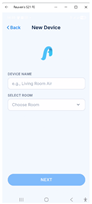
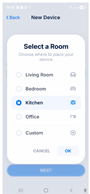
Step 3 – Select a Room
Select the room where your device will be placed, then tap OK.
Step 4 – Tap NEXT
After entering a device name and selecting a room, tap the NEXT button.
The Activate Device screen will appear.
Step 5 – Enter Your License Key
In the input field on the Activate Device screen, type or paste your license key exactly as it appears in your welcome email or on the device box.
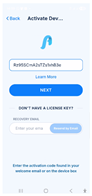
The screen reminds you: "Enter the activation code found in your welcome email or on the device box"
Step 6 – Tap NEXT to Complete Activation
Tap the NEXT button to confirm.
Your device is now activated and ready to use.
Don't Have Your License Key?
If you cannot locate your license key, the app can resend it to you by email:
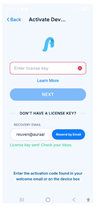
- On the Activate Device screen, scroll down to the DON'T HAVE A LICENSE KEY? section.
- Enter your email address in the RECOVERY EMAIL field.
- Tap Resend by Email.
- You will see a green confirmation: "License key sent! Check your inbox."
- Check your inbox for the Aura Air email with your license keys.
- Copy the key, paste it into the license key field, then tap NEXT.
License Key Validity & Renewal
How long does a license key last?
License keys are valid for one year from the date of activation (not from the purchase date).
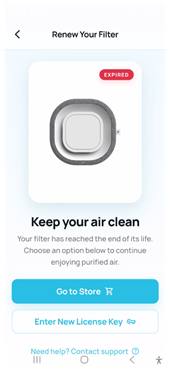
What happens when a license expires?
- Device monitoring stops working
- You cannot change device settings in the app
- The Activate Device screen will appear when you open the device
How to renew:
- Step 1: Purchase a replacement filter: each Aura Air replacement filter includes a new license key. See our web site for purchase Aura Air.
- Step 2: Open your device in the app.
- Step 3: Enter the new license key on the Activate Device screen.
- Step 4: Tap NEXT: your device is now licensed for another year.
Was this article helpful?
That’s Great!
Thank you for your feedback
Sorry! We couldn't be helpful
Thank you for your feedback
Feedback sent
We appreciate your effort and will try to fix the article