The Reports page helps you download maintenance reports and sensor data for your devices. Choose from filter maintenance reports or detailed sensor data exports.
Filter & Pre-Filter Reports
- Click the Filters or Aura Pre-Filter tabs to view monthly maintenance reports
- Use "See Full List" to browse all available reports
- Click Export to download reports
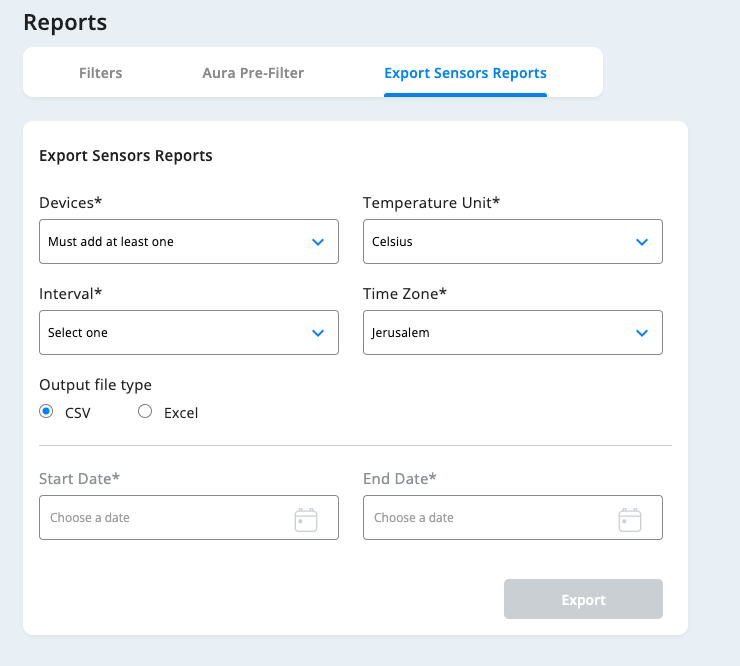
Export Sensors Reports
Generate custom sensor data reports by configuring:
- Devices: Select one or more devices
- Output Format: Choose CSV or Excel
- Temperature Unit: Celsius or Fahrenheit
- Data Interval: Realtime, 5 minutes, 15 minutes, or 30 minutes
- Time Zone: Select your preferred timezone
- Date Range: Pick start and end dates
- Export: Click Export to generate the report
Important: Exported files are sent to your registered email address from your Profile section.
Was this article helpful?
That’s Great!
Thank you for your feedback
Sorry! We couldn't be helpful
Thank you for your feedback
Feedback sent
We appreciate your effort and will try to fix the article