The Floors tab in the Management section allows you to organize your devices by floor or location, making it easier to manage large installations across multiple levels or areas. This centralized view helps you track device distribution, schedule maintenance, and coordinate cleaning activities by floor.
Floor Management Functions
- Create new floors for your building or facility
- Edit existing floor details and settings
- Assign multiple devices to specific floors
- Set pre-filter cleaning schedules by floor
- Track when floors were added to the system

Floor
- Shows the custom name for each floor (e.g., "Floor 29")
- Names can be edited to match your building's actual floor numbering or naming convention
- Click to edit floor details
Devices per floor
- Displays the total number of devices assigned to each floor
- Shows actual count (e.g., "5 Devices")
- Helps you understand device distribution across your facility
Date added
- Shows when the floor was first created in the system
- Useful for tracking setup timeline and system expansion
- Format: DD/MM/YY (e.g., "15/07/24")
Aura Pre filter cleaning day
- Displays the scheduled cleaning day for all devices on this floor
- Shows frequency setting (e.g., "The 10 of every month")
- Allows coordinated maintenance scheduling across floor devices
Adding and Editing Floors
Add New Floor
- Click the "+ Add New" button to create a new floor
- Assign devices during creation or add them later
- Set cleaning schedules that apply to all floor devices
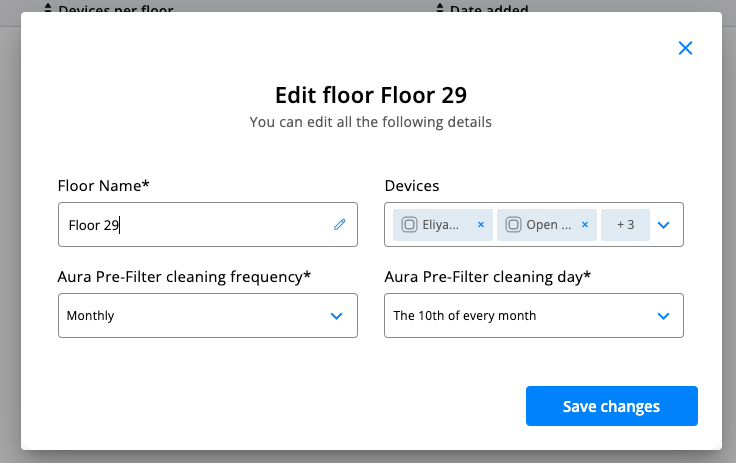
Edit Floor Details The edit dialog allows you to modify:
Floor Name
- Type in the new floor name you want or edit the current floor name that appears in the field
- Customize the floor identifier to match your building's actual floor numbering or naming convention
- Use clear naming conventions for easy identification
Devices Assignment
- Add or remove devices from the floor
- View currently assigned devices
- Manage device groupings by location
Pre-Filter Cleaning Settings
- Cleaning Frequency: Choose from options like Monthly, Weekly, or custom intervals
- Cleaning Day: Set specific day of month (e.g., "The 10th of every month")
- These settings apply to all devices on the floor for coordinated maintenance
Benefits of Floor Organization
- Simplified Maintenance: Schedule cleaning for entire floors at once
- Better Resource Planning: Know exactly how many devices need service per floor
- Improved Coordination: Send maintenance teams to specific floors with clear device counts
- Facility Overview: Understand device distribution across your building
Best Practices
- Use consistent naming conventions for floors (e.g., "Floor 1," "Floor 2" or "Ground Floor," "Second Floor")
- Coordinate cleaning schedules to minimize disruption
- Regularly review device assignments when relocating equipment
- Consider maintenance access when setting cleaning days
Quick Actions
- Edit floor settings using the pencil icon
- Delete floors using the trash icon (devices must be reassigned first)
- Download floor reports for maintenance planning
This floor organization system streamlines facility management by grouping devices logically and coordinating maintenance activities across your building.
Was this article helpful?
That’s Great!
Thank you for your feedback
Sorry! We couldn't be helpful
Thank you for your feedback
Feedback sent
We appreciate your effort and will try to fix the article