Your Command Center for Air Quality Management
The Dashboard is your central hub for managing, tracking, and controlling all your Aura Air devices with real-time data about indoor and outdoor air quality. This comprehensive overview gives you complete visibility into your air quality status and device performance at a glance.
Navigation & Location Management
Top Menu Navigation: Use the top menu bar to browse between different locations. Each location tab shows:
- Location name and address
- Number of active devices in that location
- Quick status indicators
Adding New Locations: Click the "Add New Location" button to set up monitoring for additional sites. Perfect for businesses with multiple offices, schools with different buildings, or managing both home and work locations.

Outdoor Air Quality Section
What You'll See: The outdoor air quality section displays current environmental conditions with real-time outdoor data. This includes:
- Current Temperature & Humidity: Real-time weather conditions
- Outdoor AQI: Air Quality Index from 0 (excellent) to 500 (hazardous)
- Pollutant Breakdown: CO, PM 2.5, PM 10, O3, NO2, and SO2
- Weather Forecast: Plan ahead with upcoming air quality conditions
- Personalized Recommendations: Smart suggestions based on current outdoor conditions
Why This Matters: Understanding outdoor conditions helps you plan your week in advance and create smart, effective workflows by learning about upcoming poor air quality conditions.

Indoor Air Quality Section
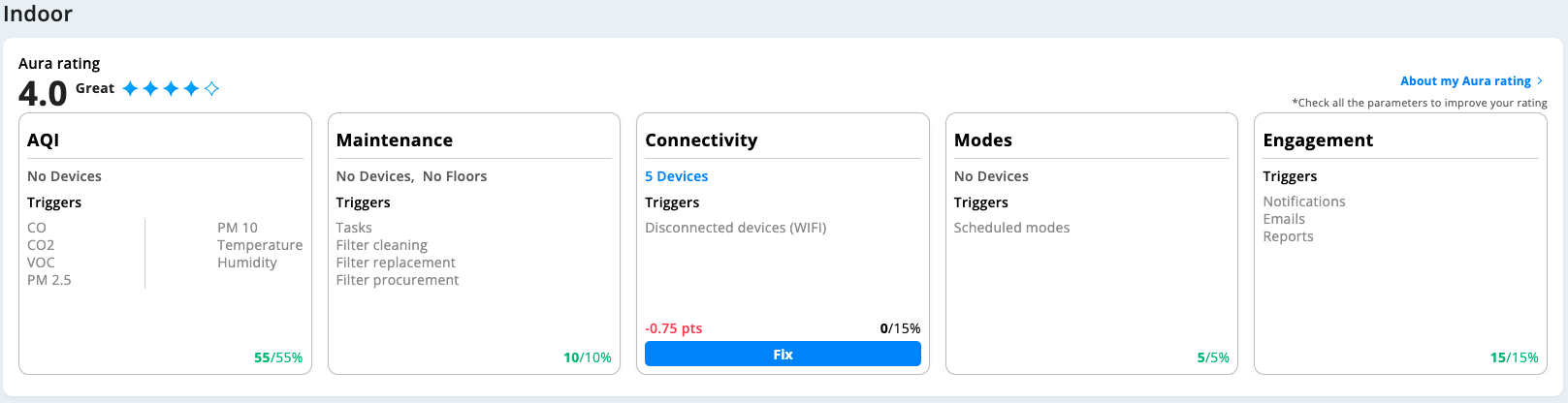
The Aura Rating System Our unique Aura Rating system helps you track and improve your overall air quality by monitoring CO, CO2, VOC, PM2.5, PM10, temperature, humidity, and other climate factors. This comprehensive scoring system consists of five key areas:
1. AQI Monitoring
- Real-time air quality readings from all devices
- Identify which specific pollutants are affecting each room
- Alert system for when air quality drops below acceptable levels
- Historical trends and patterns
2. Device Modes Management
- Set all devices modes to your desired settings
- Customize individual device settings
- Schedule mode changes for different times of day
3. Maintenance Tracking
- Filter Replacement Alerts: Know exactly when filters need changing
- Pre-Filter Cleaning Reminders: Keep your devices running efficiently
- Maintenance Schedule: Plan and track all maintenance activities
- Technician Dispatch: Send maintenance teams to specific locations
4. Connectivity Status
- Device Health Monitoring: See which devices are online/offline
- Network Diagnostics: Identify WiFi or connection issues
- Technician Alerts: Automatically notify support teams for reconnection
5. User Engagement Analytics
- Track how actively users interact with the system
- Identify areas where additional training might be needed
- Usage patterns and optimization opportunities
- How engaged users are with the Web Platform
Getting the Most from Your Dashboard
Daily Use Tips:
- Check the main overview each morning to understand your day's air quality outlook
- Set up automated alerts for maintenance needs
- Use the outdoor forecast to prepare for poor air quality days
- Monitor engagement levels to ensure your team is maximizing the system
For Facility Managers:
- Set up location-specific user permissions
- Create maintenance schedules aligned with your operations
- Use analytics to demonstrate ROI and compliance
- Integrate with existing building management systems
Troubleshooting Access:
- Ensure all devices are connected to WiFi
- Check that user permissions are set correctly for each location
- Contact support if any sections aren't loading properly
- Use the connectivity section to identify and resolve device issues
This comprehensive dashboard puts complete air quality control at your fingertips, whether you're managing a single room or an entire enterprise with multiple locations.
Was this article helpful?
That’s Great!
Thank you for your feedback
Sorry! We couldn't be helpful
Thank you for your feedback
Feedback sent
We appreciate your effort and will try to fix the article