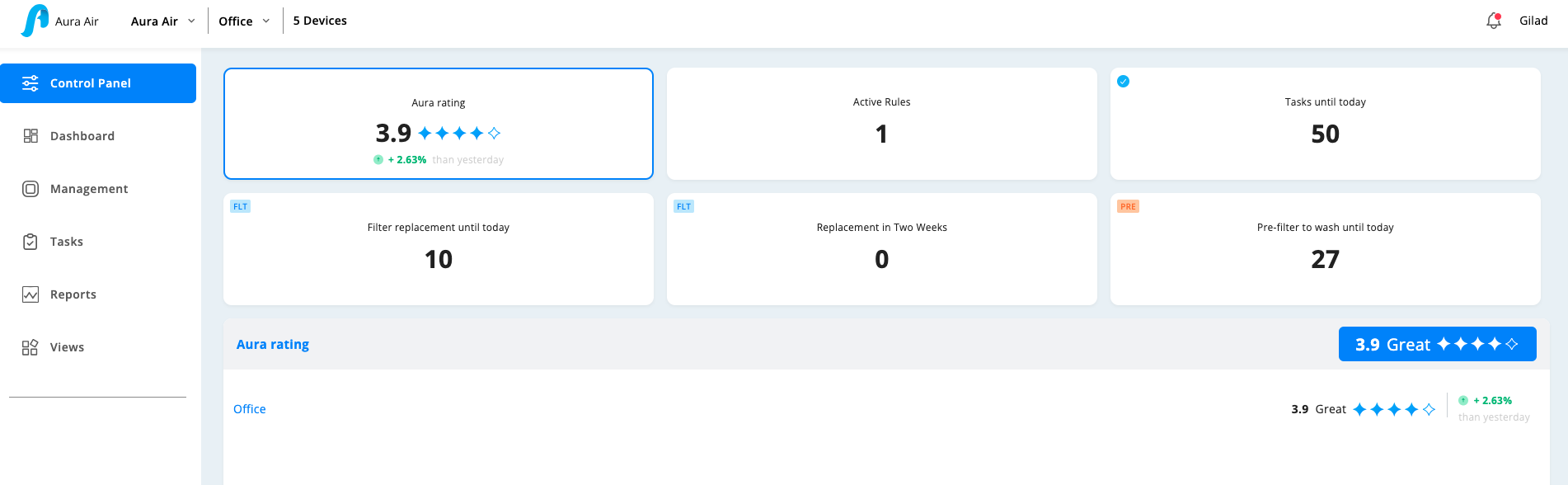
The Control Panel is the central command center for owners and administrators managing multiple locations. This dashboard provides a comprehensive overview of all indoor air quality actions, insights, and tasks across your entire network of devices.
Dashboard Widgets
Aura Rating
- Overall Score: Combined air quality rating from all locations with star system (1-5)
- Trend Indicator: Shows percentage improvement or decline from previous day
- Location Breakdown: Individual ratings for each location you manage
Active Rules
- Real-time Monitoring: Current number of active rules across all locations
- Recent Violations: Top rules that triggered outside your defined ranges in the last 24 hours
- Rule Performance: Track which locations need attention
Tasks Management
- Tasks Until Today: Total actionable tasks that need completion for continued clean air
- Priority System: Shows most urgent maintenance and operational tasks
- Multi-Location View: Tasks organized by location and urgency
Filter Replacement Tracking
- Immediate Needs (FLT): Ray Filters requiring replacement today, sorted by most urgent dates
- Upcoming Replacements (FLT): Filters needing replacement within two weeks
- Location-Specific: Breakdown showing exactly which devices need attention
Pre-Filter Maintenance (PRE)
- Cleaning Schedule: Aura Air units requiring pre-filter washing
- Maintenance Tracking: Ensures optimal device performance through regular cleaning
- Location Distribution: See which locations need the most attention
Benefits of Control Panel
- Centralized Management: Monitor all locations from one screen
- Proactive Maintenance: Stay ahead of filter replacements and cleaning schedules
- Performance Insights: Track air quality improvements across your network
- Task Prioritization: Focus on the most urgent maintenance needs first
Best Practices
- Check the Control Panel daily for urgent tasks and filter replacements
- Address items marked for "today" completion immediately
- Use the two-week filter forecast to plan ahead and order supplies
- Monitor Active Rules to ensure your automation is working effectively
This centralized view ensures nothing falls through the cracks while maintaining healthy air quality across all your managed locations.
Was this article helpful?
That’s Great!
Thank you for your feedback
Sorry! We couldn't be helpful
Thank you for your feedback
Feedback sent
We appreciate your effort and will try to fix the article